
Proxy n8n with LiteSpeed Web Server

If you are running cPanel with LiteSpeed Enterprise and want to deploy a modern automation service such as n8n, the setup can be both straightforward and reliable.
In this article, we will walk through a basic example of running n8n inside Docker on a cPanel server, then publishing it through LiteSpeed Enterprise using reverse proxy rules that support both normal HTTP traffic and WebSocket connections.
Set up n8n
Below is a n8n example docker-compose.yml used for the n8n.example.com domain:
version: "3.8"

services:
  n8n:
    image: docker.n8n.io/n8nio/n8n:latest
    container_name: n8n

    ports:
      - "127.0.0.1:5678:5678"

    environment:
      - TZ= America/Los_Angeles
      - N8N_HOST=n8n.example.com
      - N8N_PROTOCOL=https
      - N8N_PROXY_HOPS=1
      - WEBHOOK_URL=https://n8n.example.com/
      - N8N_EDITOR_BASE_URL=https://n8n.example.com/
      - N8N_ENFORCE_SETTINGS_FILE_PERMISSIONS=true
      - N8N_RUNNERS_ENABLED=true
    volumes:
      - n8n_data:/home/node/.n8n

    restart: unless-stopped

volumes:
  n8n_data:
A few points are worth highlighting here:
N8N_HOST,N8N_PROTOCOL,WEBHOOK_URL, andN8N_EDITOR_BASE_URLhelp n8n understand that it is being served behind HTTPS on the public domain.N8N_PROXY_HOPS=1is important when n8n is behind a reverse proxy, because it helps n8n trust the forwarded request information correctly.
Learn more about n8n environment variables.
Proxy Setup
To support both HTTP requests and WebSocket traffic, we used Apache-style userdata include files in cPanel.
We added the following:
<IfModule mod_rewrite.c>
RewriteEngine on
RewriteRule (.*) http://localhost:5678/\$1 [P,L]
ProxyPass / ws://localhost:5678/
</IfModule>
to /etc/apache2/conf.d/userdata/ssl/2_4/n8examplecom/proxy.conf for the SSL configuration and to /etc/apache2/conf.d/userdata/std/2_4/n8examplecom/proxy.conf for the non-SSL configuration.
This configuration allows the domain to proxy regular traffic to the n8n container on localhost:5678, while also passing WebSocket connections correctly.
Note: The backend target is always plain HTTP because SSL termination happens at the web-server level.
After saving the include files, we rebuilt and reloaded the web server configuration, like so:
/scripts/buildhttpdconf
systemctl restart lsws
Domain access
Once DNS, SSL, Docker, and proxy rules are all in place, you can visit the public domain at https://n8n.example.com.
From there, register your account on the n8n instance and begin building workflows.
Set up simple test workflow
To confirm that the reverse proxy and application are working properly, create a simple test workflow:
- Receive a webhook request
- Make an HTTP request to
api.ipify.org - Return the detected IP address as JSON
Webhook node
Use these two URLs:
- Test URL:
https://n8n.example.com/webhook-test/test-api - Production URL:
https://n8n.example.com/webhook/test-api
Set the webhook response mode to Using "Respond to Webhook" node.
HTTP Request node
Create an HTTP Request node with:
- Method:
GET - URL:
https://api.ipify.org?format=json
This endpoint returns a simple JSON response containing the requester IP address.
Respond to Webhook node
Set the following:
- Respond With:
JSON - Response Body (Expression):
  {
  "myIP": "{{$json.ip}}"
  }
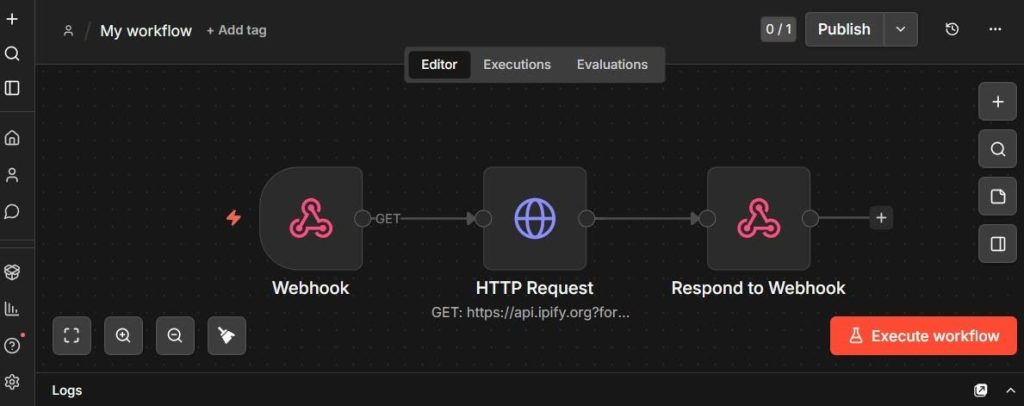
The image above shows what the workflow looks like in the editor.
Activate the workflow
Activate the workflow to validate the webhook.
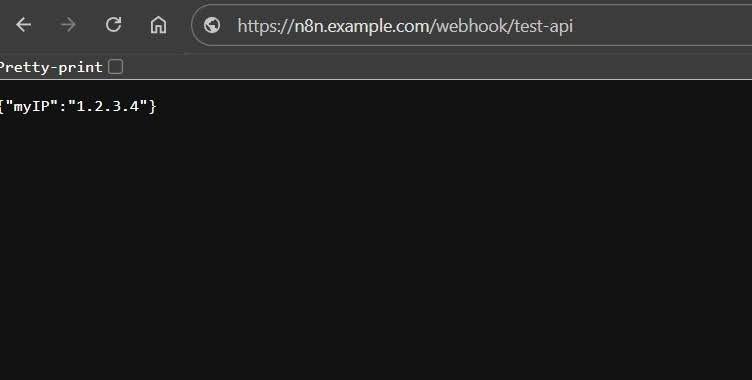
After activating the workflow, visiting the webhook URL in the browser should return a JSON response showing your IP address, like so:
{"myIP": "192.0.2.0"}
This is a simple but useful validation test, because it confirms:
- the domain is reachable
- HTTPS is working
- the reverse proxy is forwarding requests correctly
- n8n is processing the workflow
- the response is being returned properly through LiteSpeed
Conclusion
Running n8n on cPanel with LiteSpeed Enterprise and Docker is practical. With the right proxy configuration, it is possible to support both standard HTTP traffic and WebSocket connections cleanly, while keeping the service accessible over HTTPS on its own domain.
If you are looking for a clean way to publish n8n on a LiteSpeed Enterprise server, this is a solid approach.
Comments